
Ford Fiesta: Information and Entertainment System - General Information - Vehicles With: AM/FM/CD/SYNC / Microphone. Removal and Installation
Ford Fiesta 2014 - 2019 Service Manual / Information and Entertainment Systems / Information and Entertainment System - General Information - Vehicles With: AM/FM/CD/SYNC / Microphone. Removal and Installation
Special Tool(s) / General Equipment
| Interior Trim Remover |
Removal
NOTE: If the microphone is removed from the headliner, a new microphone must be installed.
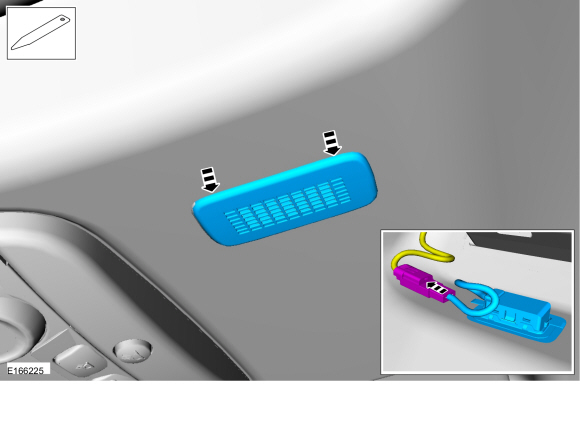
Headliner Microphone
-
Pry the microphone bezel from the headliner metal mounting bracket and remove the microphone from the headliner by grasping the microphone pigtail.
-
Disconnect the electrical connector.
Use the General Equipment: Interior Trim Remover
-
Disconnect the electrical connector.
 |
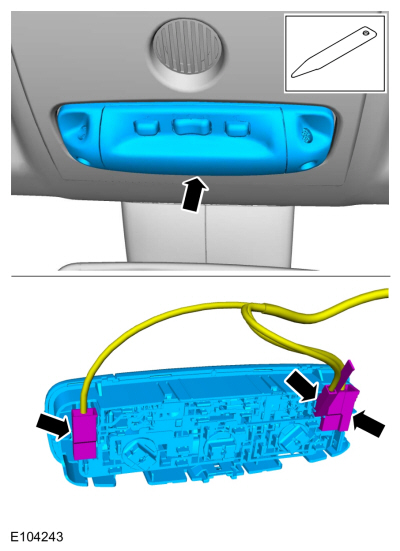
Overhead Console Microphone
NOTE: Overhead console without sunglass bin shown, overhead console with sunglass bin similar.
-
Remove the overhead console lighting switch.
-
Disconnect the electrical connectors.
Use the General Equipment: Interior Trim Remover
-
Disconnect the electrical connectors.
 |
-
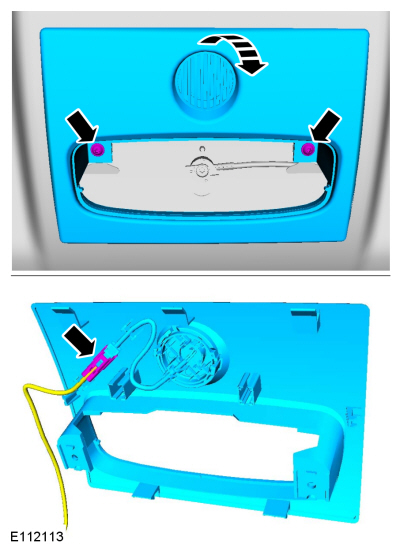
Remove the screws and the overhead console.
-
Disconnect the electrical connector.
-
Disconnect the electrical connector.
 |
-
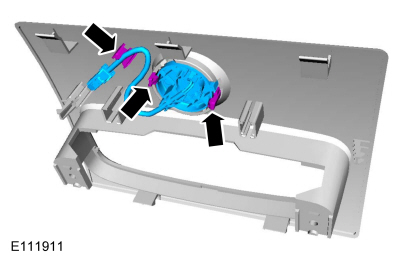
Release the tabs, detach the retainer and remove the Sync Microphone.
 |
Installation
Headliner Microphone
-
Connect the microphone electrical connector.
-
Wrap the connection with anti-rattle tape.
-
Feed the microphone pigtail into the headliner
through the microphone hole. Verify the microphone pigtail points
towards the front of the vehicle.
-
Snap the microphone into the headliner mounting bracket.
-
Install the headliner mounting bracket in the headliner.
Overhead Console Microphone
-
To install, reverse the removal procedure.
 Global Positioning System Module (GPSM). Removal and Installation
Special Tool(s) /
General Equipment
Interior Trim Remover
Removal
NOTE:
This step is only necessary when installing a new component...
 Rear Door Speaker. Removal and Installation
Removal
NOTE:
Removal steps in this procedure may contain installation details.
Remove the rear door trim panel.
Refer to: Rear Door Trim Panel (501-05 Interior Trim and Ornamentation, Removal and Installation)...
Other information:
Ford Fiesta 2014 - 2019 Service Manual: Rear Door Alignment. General Procedures
Inspection Check the body to the rear door dimensions. Refer to: Body and Frame (501-26 Body Repairs - Vehicle Specific Information and Tolerance Checks, Description and Operation). Adjustment NOTE: LH side shown, RH side similar...
Ford Fiesta 2014 - 2019 Service Manual: Diagnostic Trouble Code Charts. Diagnosis and Testing
Master DTC Index ABS Module REFER to: Anti-Lock Brake System (ABS) and Stability Control (206-09 Anti-Lock Brake System (ABS) and Stability Control, Diagnosis and Testing). ACM REFER to: Information and Entertainment System (415-00 Information and Entertainment System - General Information..
Categories
- Manuals Home
- Ford Fiesta Service Manual (2014 - 2019)
- Front Suspension
- Engine. Assembly
- Engine Component View. Description and Operation
- Brake System
- Engine System - General Information
Rear Wheel Speed Sensor. Removal and Installation
Removal
NOTE: Removal steps in this procedure may contain installation details.
Remove the retainer and pull the rear splash shield outward.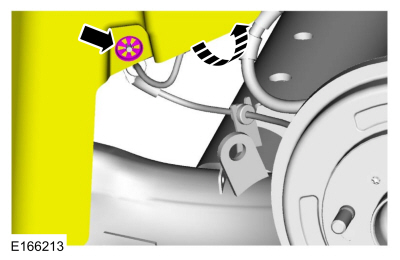 Disconnect the electrical connector and detach the wiring retainer.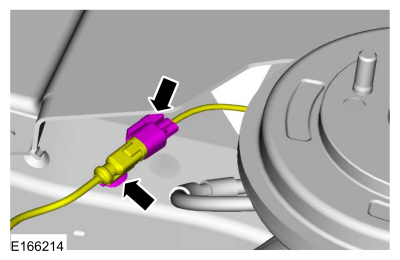

Copyright © 2026 www.fofiesta7.com